Git
Custom Config
ssh: Username & email & key
git config --global user.name 'HX'
git config --global user.email '[email protected]'
ssh-keygen -t rsa -C '[email protected]'

# Check connect to github
ssh -Tv [email protected]

# Paste following to github setting
cat ~/.ssh/id_rsa.pub
Case sensitive
git config core.ignorecase false
# https://stackoverflow.com/questions/71230581
# https://juejin.cn/post/7135422871735631902
Setting Default Editor
git config --global core.editor "vim"
# https://stackoverflow.com/questions/2596805
Commit
Init
git initClone
git clone ssh://[email protected]/repo.git
git clone -b main --single-branch ssh://[email protected]/repo.git
Status
git status
git diff # Changes to tracked files
Add
git add .Commit
git commit
git commit -m "feat(xxx): xxx"
NOTE
约定式提交,有 3 种方案:
Add / Fix / ....首选动词,并且首字母大写,尽量简洁描述自己的内容,比较简陋;fix: xxx / feat: xxx / docs: xxx每次都需要选一个类似这样的 tag 打上去,方便后面检索;:tada: xxx / :books: xxx / bug: xxx利用 Github 实现的 Emoji 作为 tag,类似 2,并且可以在 Github 上显示更好?via: https://stackoverflow.com/questions/9742073/graphics-in-github-commit-messages
我更偏好第二种,如下:
  feat: add hat wobble
  ^--^  ^------------^
  |     |
  |     +-> Summary in present tense.
  |
+-------> Type: chore, docs, feat, fix, refactor, style, or test.feat- 添加新特性、新功能( feature )
fix- 修复 bug
docs- 仅仅修改了文档
style- 仅仅修改了空格、格式缩进、逗号等等,不改变代码逻辑
refactor- 代码重构,没有加新功能或者修复 bug
perf- 性能测试
test- 测试用例
chore- 改变构建流程、或者增加依赖库、工具等
更多内容规范可以参考:
- https://www.conventionalcommits.org/zh-hans/v1.0.0-beta.4
- https://gist.github.com/qoomon/5dfcdf8eec66a051ecd85625518cfd13
History
git log
git log --oneline
git blame <file>
Push & Pull
git pull <remote> <branch>
git push <remote> <branch>

git remote -v # List all currently configured remotes
git remote show <remote> # Show information about a remote
git remote add <shortname> <url> # Add new remote repository, named <remote>
# git submodule add <url>/<ssh>
git fetch <remote> # Download all changes from <remote>

git branch -dr <remote/branch> # Delete a branch on the remote
git push --tags # Publish your tags
git fetch + git merge == git pull via https://www.jianshu.com/p/a5c4d2f99807
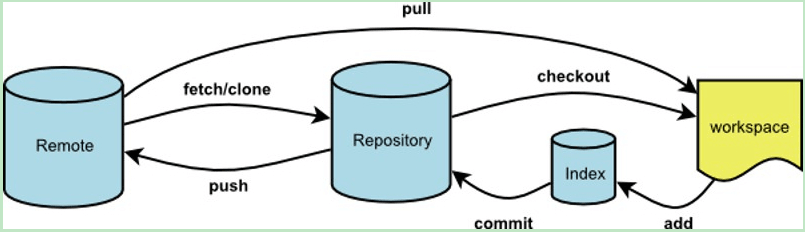
git fetch origin master
git log -p master..origin/master
git merge origin/master
git fetch origin master:tmp
git diff tmp
git merge tmp
# via: https://blog.csdn.net/hudashi/article/details/7664457
Rollback
Warning
慎重使用
--hard,他会直接恢复到了上一次的 commit 状态,删除工作空间改动代码,撤销commit,撤销git add .,如果本地有什么改动没有提交的话,会直接清空。
From Add
git reset --mixed
# 保留修改, 退出暂存区, --mixed 为默认参数
git reset HEAD
# 撤销 add (绿字变红字)
git checkout -- (file)
# 撤销没 add 的修改 (红字变无)
From Commit
git reset --soft HEAD^
# 不删除工作空间改动代码, 撤销 commit, 不撤销 git add
git commit --amend
# commit 注释写错了, 只想改一下注释
From Global
如果有什么重大调整,可以直接用 reflog 进行回顾
git reflogMerge
jetbrains Gui tools
外部程序直接可以调用 IDEA 的 Git Merge 工具;
[diff]
	guitool = intellij
[difftool "intellij"]
	path = C:/Program Files/JetBrains/IntelliJ IDEA Community Edition 2023.3.2/bin/idea.bat
	cmd = \"C:/Program Files/JetBrains/IntelliJ IDEA Community Edition 2023.3.2/bin/idea.bat\" diff \"$LOCAL\" \"$REMOTE\"
[merge]
	guitool = intellij
[mergetool "intellij"]
	path = C:/Program Files/JetBrains/IntelliJ IDEA Community Edition 2023.3.2/bin/idea.bat
cmd = \"C:/Program Files/JetBrains/IntelliJ IDEA Community Edition 2023.3.2/bin/idea.bat\" merge \"$LOCAL\" \"$REMOTE\" \"$BASE\" \"$MERGED\"并非银弹
via: https://www.xttblog.com/?p=5294 Untracked Files Prevent Checkout* Move or commit them before checkout
Command-line
git merge <branch>
git rebase <branch>
git rebase --abort
git rebase --continue
git mergetool
git add <resolved-file>
git rm <resolved-file>
rebase check https://juejin.cn/post/7038093620628422669
Force reset merge other branch
git reset --hard dev/1197via: https://stackoverflow.com/a/59238409
Submodules
Add
git submodule add https://github.com/yyy/xxx.git
git submodule status
git submodule deinit
git clone https://github.com/yyy/xxx.git --recursive #子模块也一起 clone, or using for
git submodule init && git submodule update # euqal following
git submodule update --init
git submodule update --init --recursive # 递归添加
via: https://knightyun.github.io/2021/03/21/git-submodule
Remove
git rm --cached path/to/submodule
rm -rf path/to/submodule
然后注释 .gitmodules 相关配置即可
Brach
git branch -av
git checkout <branch> # Switch HEAD branch
git branch <new-branch> # Create a new branch based
git checkout --track <remote/branch> #Create a new tracking branch based on a remote branch
git branch -d <branch> # Delete a local branch
Tag
git tag <tag-name>

git log 								# list all tags
git tag -l "v1.8.5*" 					# list with regex

git tag -a v1.4 -m "my version 1.4" 	# annotated 附注标签

git push origin v1.5 					# push sepecific
git push origin --tags # push alltag: 每一个正式发布的版本 merge 到 master 并且打一个 tag
用例:利用打 tag 自动部署一次应用
via: https://git-scm.com/book/zh/v2/Git-%E5%9F%BA%E7%A1%80-%E6%89%93%E6%A0%87%E7%AD%BE
Notes
revert Vs checkout vs reset
revert → commit level, no file level
safe operation for ‘public undos’ as it creates new history which can be shared remotely and doesn’t overwrite history remote team members may be dependent on.
checkout → commit level & file level
A checkout is an operation that moves the HEAD ref pointer to a specified commit
reset
A reset is an operation that takes a specified commit and resets the “three trees” to match the state of the repository at that specified commit.
three trees → working directory & stagged snapshot & commit History
three different modes??
checkout and reset are generally used for making local or private ‘undos’. They modify the history of a repository that can cause conflicts when pushing to remote shared repositories.
git reset --hard HEAD
git checkout HEAD <file> # Discard local changes in a specific file
git revert <commit> # Revert a commit   (by producing a new commit with contrary changes)
git reset --hard <commit> # Reset your HEAD pointer to a previous commit …and discard all changes since then
git reset <commit> # and preserve all changes as unstaged changes
git reset --keep <commit> # and preserve uncommitted local changes
via: https://www.atlassian.com/git/tutorials/resetting-checking-out-and-reverting
Remote add origin vs remote set-url origin
below is used to add a new remote:
git remote add "origin" [email protected]:User/UserRepo.gitbelow is used to change the url of an existing remote repository:
git remote set-url "origin" [email protected]:User/UserRepo.gitbelow will push your code to the master branch of the remote repository defined with "origin" and -u let you point your current local branch to the remote master branch:
git push -u origin mainDocumentation https://stackoverflow.com/questions/42830557/git-remote-add-origin-vs-remote-set-url-origin
Use Cases
合并不同分支的 Commit 历史
git subtreegit merge
第一种最简单,但是文件的历史提交会断掉,虽然依然会把另一个分支的 commit 信息写入主分支,但不可追溯:
git remote add origin [email protected]:bGZo/playground.git
# git remote add docker-origin /home/bgzo/workspaces/env/docker
git fetch docker-origin
git subtree add --prefix=dockers docker-origin/main
git remote remove docker-origin
TIP
如果不想要之前的历史记录,加上
--squash即可:git subtree add --prefix=docker docker-origin/main --squash
--squash把 docker 仓库所有历史压缩成 2 个 commit(一个 squash merge commit + 一个 subtree merge commit)合入,不展开原始 commit 历史。
为什么会断档呢?
git subtree add 是把 docker 仓库的 commit 历史字面复制进来,但这些 commit 的 tree 对象里,文件路径是原始的(如 dockge/compose.yml),而合并后实际路径多加了一个前缀(变为 dcokers/dockge/compose.yml),加上 Git 的单文件历史靠路径匹配追踪变更,路径不一致时自然断档。
NOTE
subtree 本质是目录级别的移植,天然存在路径断层。
第二种稍微复杂一点,为了避免合并过去再次重命名,需要提前规划好路径,然后一把全部合并过去:
git remote add target-origin [email protected]:bGZo/playground.git
git fetch target-origin target
git merge target-origin/target --allow-unrelated-histories
git remote remove target-origin
删除 Git 历史文件/目录
NOTE
记得提前 commit,否则可能导致修改内容丢失
Install https://github.com/newren/git-filter-repo
pip3 install --trusted-host pypi.tuna.tsinghua.edu.cn -i https://pypi.tuna.tsinghua.edu.cn/simple filter-repoRemove folder
git filter-repo --path pdf --invert-pathsRemove file
git filter-repo --path readme.md --invert-paths --forceForce Push
# below is used to add a new remote:
git remote add "origin" [email protected]:xxx/xxx.git
# below is used to change the url of an existing remote repository:
git remote set-url "origin" [email protected]:User/UserRepo.git
# via: https://stackoverflow.com/questions/42830557


git push origin dev --force
Emojis supported by GitHub
来源于: https://gist.github.com/parmentf/035de27d6ed1dce0b36a, https://github.com/dannyfritz/commit-message-emoj, https://gitmoji.carloscuesta.me
| Commit type | Emoji |
|---|---|
| Initial commit | 🎉 :tada: |
| Version tag | 🔖 :bookmark: |
| New feature | ✨ :sparkles: |
| Bugfix | 🐛 :bug: |
| Metadata | 📇 :card_index: |
| Documentation | 📚 :books: |
| Documenting source code | 💡 :bulb: |
| Performance | 🐎 :racehorse: |
| Cosmetic | 💄 :lipstick: |
| Tests | 🚨 :rotating_light: |
| Adding a test | ✅ :white_check_mark: |
| Make a test pass | ✔️ :heavy_check_mark: |
| General update | ⚡ :zap: |
| Improve format/structure | 🎨 :art: |
| Refactor code | 🔨 :hammer: |
| Removing code/files | 🔥 :fire: |
| Continuous Integration | 💚 :green_heart: |
| Security | 🔒 :lock: |
| Upgrading dependencies | ⬆️ :arrow_up: |
| Downgrading dependencies | ⬇️ :arrow_down: |
| Lint | 👕 :shirt: |
| Translation | 👽 :alien: |
| Text | 📝 :pencil: |
| Critical hotfix | 🚑 :ambulance: |
| Deploying stuff | 🚀 :rocket: |
| Fixing on MacOS | 🍎 :apple: |
| Fixing on Linux | 🐧 :penguin: |
| Fixing on Windows | 🏁 :checkered_flag: |
| Work in progress | 🚧 :construction: |
| Adding CI build system | 👷 :construction_worker: |
| Analytics or tracking code | 📈 :chart_with_upwards_trend: |
| Removing a dependency | ➖ :heavy_minus_sign: |
| Adding a dependency | ➕ :heavy_plus_sign: |
| Docker | 🐳 :whale: |
| Configuration files | 🔧 :wrench: |
| Package.json in JS | 📦 :package: |
| Merging branches | 🔀 :twisted_rightwards_arrows: |
| Bad code / need improv. | 💩 :hankey: |
| Reverting changes | ⏪ :rewind: |
| Breaking changes | 💥 :boom: |
| Code review changes | 👌 :ok_hand: |
| Accessibility | ♿ :wheelchair: |
| Move/rename repository | 🚚 :truck: |
| Other | Be creative |
References
- https://learnxinyminutes.com/docs/zh-cn/git-cn/
- https://git-scm.com/book/en/v2/Getting-Started-About-Version-Control
- git-cheatsheet.pdf
- https://github.com/liangzr/github-run
- https://github.com/sallar/github-contributions-canvas
- https://gist.github.com/joshbuchea/6f47e86d2510bce28f8e7f42ae84c716
- https://www.conventionalcommits.org/
- https://seesparkbox.com/foundry/semantic_commit_messages
- http://karma-runner.github.io/1.0/dev/git-commit-msg.html